StarShipDealers — Guides
Everything you need to complete a secure trade: escrow, delivery steps, and dispute flow.
Buyer's Guide
Your Rights
Escrow Protection
Your money is held safely in escrow until you confirm delivery. No risk of losing funds.
Full Refund Guarantee
If item not received or wrong item delivered, you get a complete refund.
24-Hour Inspection Period
After delivery, you have 24 hours to verify the item matches the listing.
Fair Dispute Resolution
Independent review process protects your interests if something goes wrong.
Your Obligations
Before Purchase
- Verify your email - This is where your item will be delivered
- Read listing carefully - Check item details, delivery time
After Delivery
- Inspect item within 24 hours - Check it matches the listing
- Confirm receipt OR file dispute - Don't miss the 24h deadline
- Provide evidence if disputing - Screenshots required
How the Purchase Process Works
Find & Order
- Browse the marketplace
- Add items to cart
- Review total: Item price + $3.00 escrow fee
- Confirm purchase
Secure Payment
- Funds held in secure escrow
- Seller receives notification
- 24-hour delivery countdown starts
Receive Delivery
- Seller sends gift to your email
- Check email for delivery confirmation
- You have 24 hours to inspect
Confirm or Dispute
- ✅ Accept = Seller paid
- ⚠️ Dispute = Platform reviews
- ⏱️ No action = Auto-accepts after 24h
Disputes & Refunds
When You Can File a Dispute
- Item not received after delivery deadline
- Wrong item delivered (different from listing)
- Item doesn't match description (missing features, wrong specs)
Must be filed within 24 hours of delivery notification and BEFORE acceptance
How to File a Dispute
- Click 'File Dispute' button in your order dashboard
- Select dispute reason (non-delivery, wrong item, not as described)
- Upload screenshot evidence from your RSI Hangar
- Platform reviews within 48-72 hours
Refund Process
| Outcome | Result |
|---|---|
| Seller's fault | Full refund minus escrow fee |
| Your fault | No refund |
| Partial fault | Resolution Committee decides |
Important Rules
❌ You CANNOT
- Request refund after accepting delivery
- File false disputes to get free items
- Share account access with sellers
- Reverse payment after accepting delivery
🚫 Consequences
- False disputes → Account suspension
- Chargebacks → Permanent ban + legal action
- Missed 24h window → No refund guarantee
Fees Breakdown
| Fee Type | Amount | Who Pays |
|---|---|---|
| Escrow Fee | $3.00 per order | Buyer |
| Payment Processing | ~3% (varies by method) | Included in price |
Item Price: $100.00
Escrow Fee: +$3.00
You Pay: $103.00
Best Practices
🎯 Pro Tips for Safe Buying
- Set a reminder to inspect within 24 hours
- Carefully review the item content in the gift email before accepting it in-game
- Take screenshots of item in your hangar (your proof)
- Read seller reviews before purchasing
- Ask questions before buying if anything is unclear
- Use verified sellers when possible (safer transactions)
🚀 Speed Up Your Purchase
- Have your email ready
- Check your email for gift notifications
- Log into RSI website to accept gifts quickly
- Confirm delivery promptly to help sellers get paid
Frequently Asked Questions
Need Help?
Contact Buyer Support
- Ticket System
- 📧 Email: [email protected]
- 🚨 Urgent Issues: Use 'Priority Support' in ticket system
Response Times
- ⏱️ Response Time: 24-48 hours for general inquiries
- Disputes: 48-72 hours resolution
- Refund status: Check order dashboard
Before Contacting Support
- Check your order status in dashboard
- Review this guide for common questions
- Have your Order Number ready
- Include screenshots if applicable
Remember: You have 24 hours from delivery to inspect and confirm or dispute!
Your money is safe — Escrow protects every purchase until you're satisfied.
Seller's Guide
Your Rights as a Seller
Guaranteed Payment
Once buyer accepts delivery, your payment is guaranteed. Funds transferred to your wallet within 1 business day.
Fraud Protection
Protected against payment fraud and unauthorized chargebacks. Platform handles all payment disputes.
Fair Dispute Resolution
Impartial arbitration by Final Resolution Committee. Decisions based on evidence only.
Evidence Defense
Proper delivery screenshots protect you from false claims. Platform reviews all evidence fairly.
Your Obligations
Before Listing
- Verify your identity (KYC)
- Create accurate listings - description matches item exactly
- Set realistic delivery timeframe - maximum 24 hours
- Upload clear images - minimum 1, recommended 3+
After Sale
- Deliver within your stated timeframe - late delivery = automatic refund + 10% penalty
- Collect delivery proof - screenshots showing delivery confirmation
- Retain evidence for 120-180 days - protects you from future disputes
- Respond to disputes within 48 hours - late response = automatic buyer win
How the Sales Process Works
Create Listing
- Write accurate description
- Set fair price
- Upload quality images
- Choose delivery timeframe (max 24h)
Receive Order
- Email notification when item sells
- Buyer payment held in escrow
- Delivery countdown starts
- Check buyer's email address
Deliver Item
- Send RSI gift to buyer's email
- Take screenshots of delivery process
- Upload proof to order dashboard
- Must deliver within your timeframe
Get Paid
- ✅ Buyer accepts = Payout in 24h
- ⏱️ Auto-accept (24h) = Payout 24h later
- 💰 Funds to platform wallet (88% of price)
- 🏦 Withdraw anytime ($10 minimum)
Delivery Proof Requirements
CRITICAL: You MUST Collect Proof
Without delivery screenshots, you have NO PROTECTION against false claims. Always collect proof!
Required Screenshots
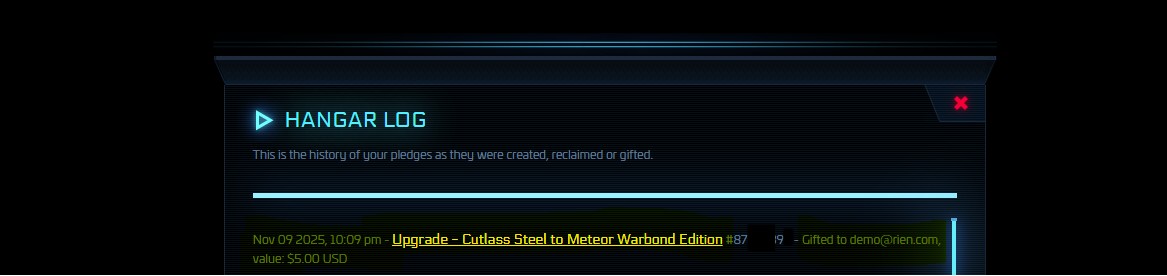
Hangar Log - Proof of Delivery
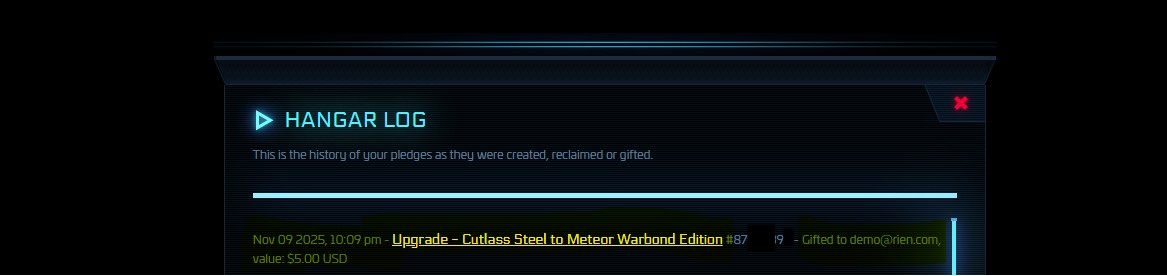
Screenshot must show: Gift sent to buyer's email, item name/details, timestamp, and confirmation message from RSI.
Click image to enlarge
Hangar Log - Proof of Reception
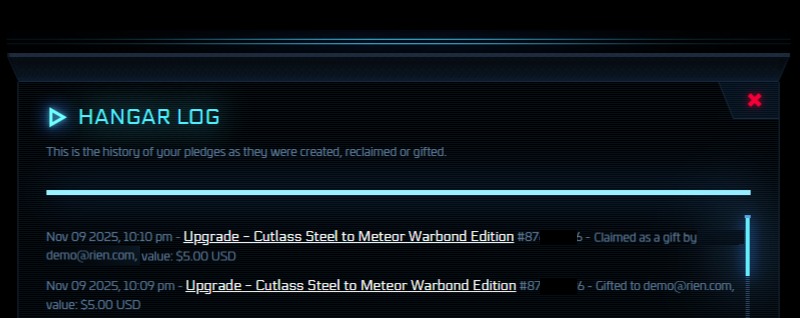
Screenshot must show: Hangar log with 'Claimed as a gift by [buyer]', item name, value, timestamp, and buyer's RSI handle visible.
Click image to enlarge
Screenshot Best Practices
- DO NOT crop or edit - Use raw, unaltered screenshots
- Include timestamps - Visible in screenshot if possible
- High quality - Clear, readable text and details
- Organize files - Name with order number (Order12345_Proof1.png)
- Retain 120-180 days - Platform may request evidence months later
Handling Disputes
48-Hour Response Deadline
You MUST respond to disputes within 48 hours. Failure to respond = automatic buyer win + full refund + 10% penalty.
Common Buyer Disputes
- Item not received (non-delivery claim)
- Wrong item delivered (incorrect item)
- Item not as described (listing mismatch)
How to Respond
- Log into your order dashboard
- Review buyer's claim and evidence carefully
- Upload your delivery proof screenshots
- Write clear, factual explanation (no emotional language)
- Submit response before 48h deadline
Dispute Outcomes
| Outcome | Result |
|---|---|
| You win | Full payout to your wallet |
| Buyer wins | Full refund to buyer + 10% penalty deducted from you |
| Partial fault | Committee decides split or compromise |
| No response (48h) | Automatic buyer win + penalties |
Important Rules
❌ You CANNOT
- Sell stolen, hacked, or exploited items
- List items you don't actually own
- Reclaim items after delivery (report to RSI)
- Create misleading or false listings
- Contact buyers off-platform
- Deliver after your stated deadline
🚫 Consequences
- Late delivery → Full refund + 10% penalty
- False listings → Account suspension + refund + 10% penalty
- Stolen items → Permanent ban + legal action
- No response to disputes → Automatic loss + penalties
- Repeated violations → Forfeiture of all payments + ban
Payment & Fees
Commission Structure
| Fee Type | Amount | When Charged |
|---|---|---|
| Platform Commission | 14% of sale price | Deducted at payout |
| Payout to Wallet | FREE | No fee |
| Withdrawal Fees | Varies by method | When withdrawing to bank/PayPal |
Item Price: $100.00
Platform Commission (14%): -$14
You Receive in Wallet: $86
Withdrawal Methods
| Method | Processing Time | Fees |
|---|---|---|
| PayPal | 1-3 business days | ~3% + $0.30 (charged by PayPal) |
| Stripe | 1-3 business days | ~2.9% + $0.30 (charged by Stripe) |
| Bank Transfer | 5-10 business days | €5-€25 (charged by banks) |
| Cryptocurrency | 1-3 days | 1% + gas fees |
Minimum withdrawal: $10. Fees charged by payment processors, not StarShipDealers.
Best Practices for Success
🎯 Maximize Sales
- Write detailed, accurate descriptions
- Upload 3+ high-quality images
- Price competitively - check similar listings
- Offer fast delivery (12h instead of 24h)
- Maintain high seller rating
- Respond quickly to buyer questions
🛡️ Protect Yourself
- ALWAYS collect delivery proof screenshots
- Organize proof by order number
- Keep evidence for 120-180 days minimum
- Set email alerts for order notifications
- Respond to disputes within 48 hours
- Never contact buyers outside platform
Frequently Asked Questions
Need Help?
Contact Seller Support
- Ticket System
- 📧 Email: [email protected]
- 🚨 Urgent Issues: Use 'Priority Support' in ticket system
Response Times
- ⏱️ General inquiries: 24-48 hours
- Disputes: 48-72 hours resolution
- Payout issues: Check wallet dashboard first
Before Contacting Support
- Check your seller dashboard for order status
- Review this guide for common questions
- Have your Order Number ready
- Include delivery proof if disputing
Remember: ALWAYS collect delivery proof screenshots. They're your only protection against false claims!
You're protected — Platform guarantees payment once buyer accepts delivery.
Proof of Delivery Guide
How to collect valid delivery evidence to protect yourself
Why Delivery Proofs Matter
Critical for Sellers
Delivery proofs protect both buyers and sellers by providing irrefutable evidence that:
- The transaction occurred
- The correct item was delivered
- Both parties fulfilled their obligations
Two Proofs Required!
You MUST collect BOTH proofs:
- Proof of Delivery (POD) - Gift Send Screen showing you sent the item
- Proof of Reception - Hangar Log showing buyer RECEIVED the item
⚠️ CRITICAL:
- POD alone is NOT final proof - A dishonest seller can cancel the gift AFTER sending the POD screenshot!
- Only Proof of Reception is irrefutable - Shows the item is permanently in buyer's hangar
- In disputes, platform will request BOTH proofs to verify delivery
No Proof = Automatic Refund
Even if you actually delivered the item, without valid proof you CANNOT defend yourself in disputes. The buyer will win automatically and you'll lose your payout.
Required Screenshot Components
For BOTH Proofs (POD + Proof of Reception)
Each screenshot MUST contain all 4 components below.
Missing ANY component = Invalid proof. Platform will reject incomplete screenshots in disputes.
Buyer's email/RSI Handle
- Visible in recipient field
- Must match order exactly
- No abbreviations or nicknames
- POD: 'Gifted to [buyer]' | Reception: 'Received by [buyer]'
Item Name
- Full item name shown
- Must match your listing description
- Include category, model, object number
Date & Timestamp
- Clearly visible in screenshot
- Must be within 24h delivery window
- UTC or local time with timezone
RSI Confirmation
- "Gifted to (buyer email)" or similar message
- System confirmation from RSI website
- Transaction ID or reference (if available)
Step-by-Step: Collecting Proof
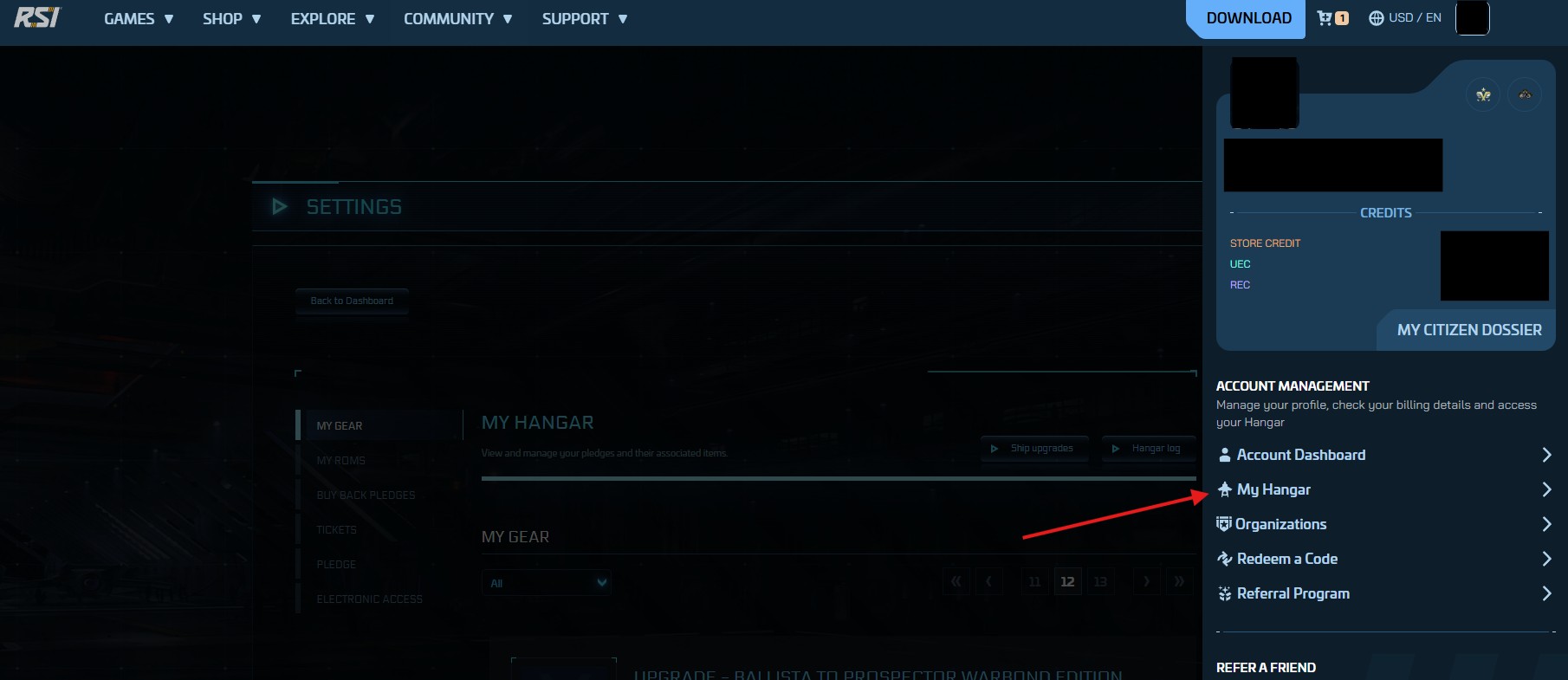
Step 1: Navigate to Your RSI Hangar
Click to enlarge
Access Your Hangar
- Log into robertsspaceindustries.com with your RSI account
- Click on your profile icon (top right)
- Navigate to 'My Hangar' from the dropdown menu
- You'll see all your pledges and items listed here
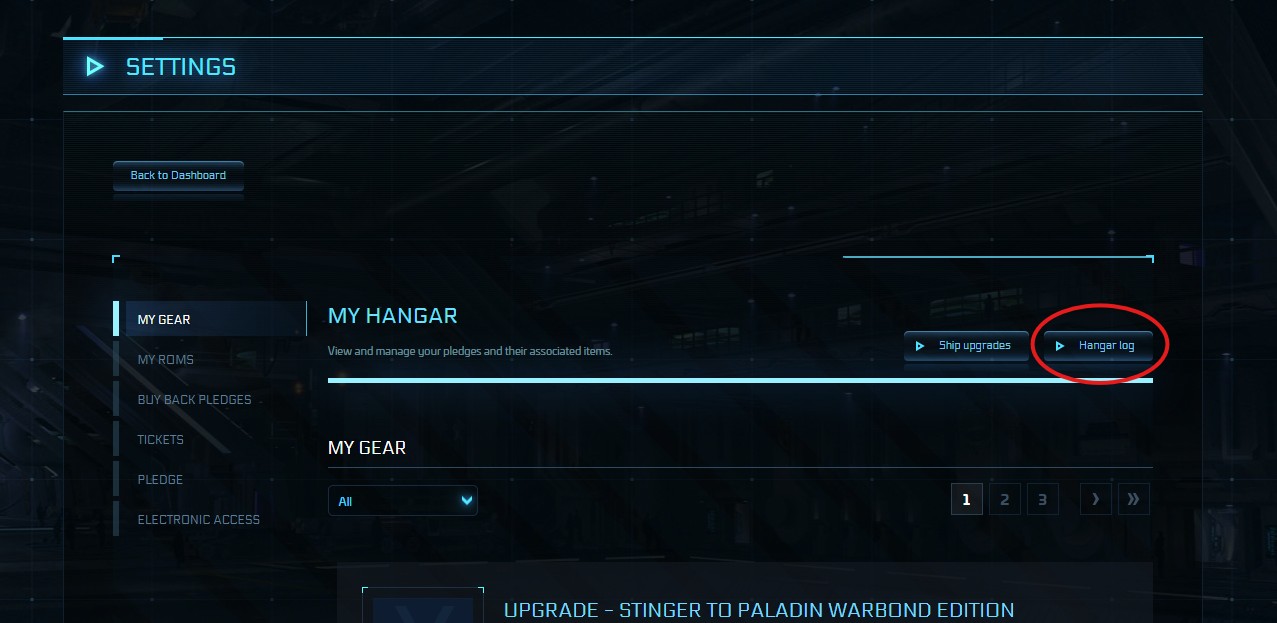
Step 2: Access the Hangar Log
Find the Gift History
- In your Hangar page, look for the 'Hangar Log' button or tab
- Click on 'Hangar Log' to view your pledge history
- This log shows all gifts sent, received, and reclaimed
- You'll find the proof of your gift delivery here
Click to enlarge
Step 3: Capture Proof of Delivery (POD)
Click to enlarge
Gift Send Screen
⚠️ Take a full-screen screenshot showing:
- The gift entry - showing 'Gifted to [buyer email]'
- Item name - Must match your listing exactly
- Timestamp - Date and time clearly visible
- Your RSI handle - Visible in the page header
Step 4: Capture Proof of Reception (OFFICIAL PROOF!)
THE ONLY IRREFUTABLE PROOF
✅ After buyer accepts the gift:
- Return to your Hangar Log (same as Step 2)
- Locate the same gift entry you captured in Step 3
- Screenshot showing 'Claimed as a gift by [buyer rsi handle]'
- This proves the item is PERMANENTLY in buyer's hangar and CANNOT be cancelled
- Shows gift was ACCEPTED, not just sent
- Cannot be cancelled or reversed by seller
- Definitive proof for dispute resolution
Click to enlarge - CRITICAL!
Screenshot Examples
Valid Proof Example
Click to enlarge
Why it's valid: All 4 components clearly visible, RSI confirmation, timestamp within window, matches order exactly. (object number must be shown)
Invalid Proof Examples
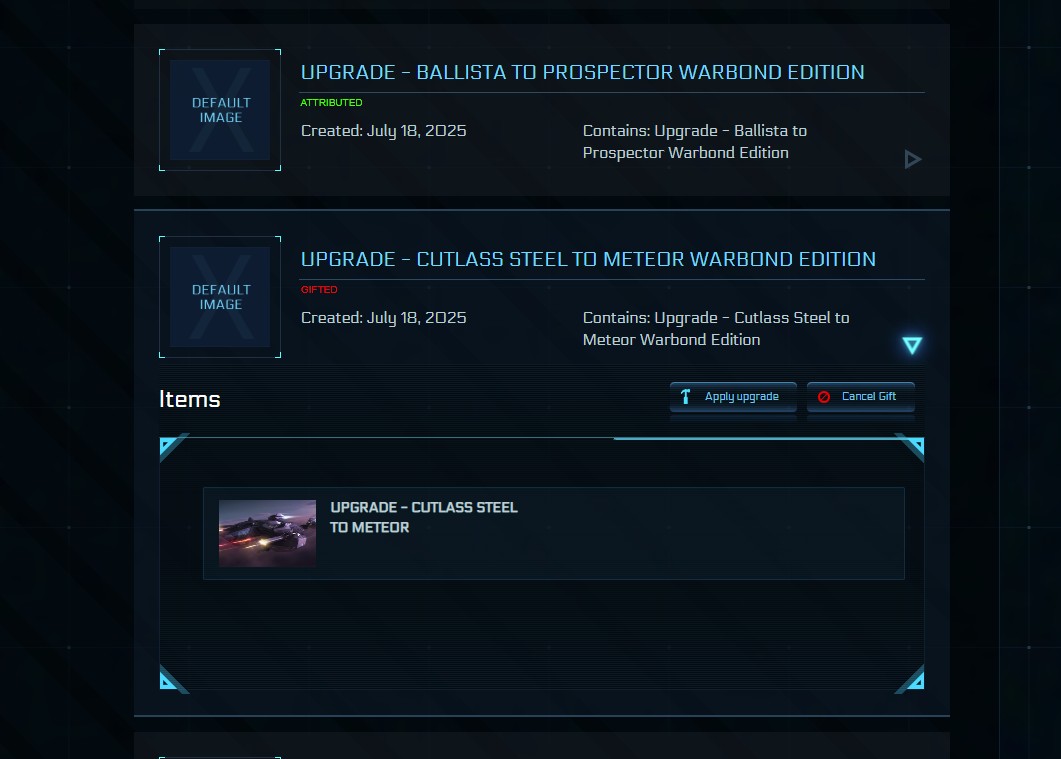
❌ Hangar Screenshot Only
Click to enlarge
❌ Missing: Recipient, confirmation, timestamp
Why invalid: Doesn't prove you sent to the right buyer
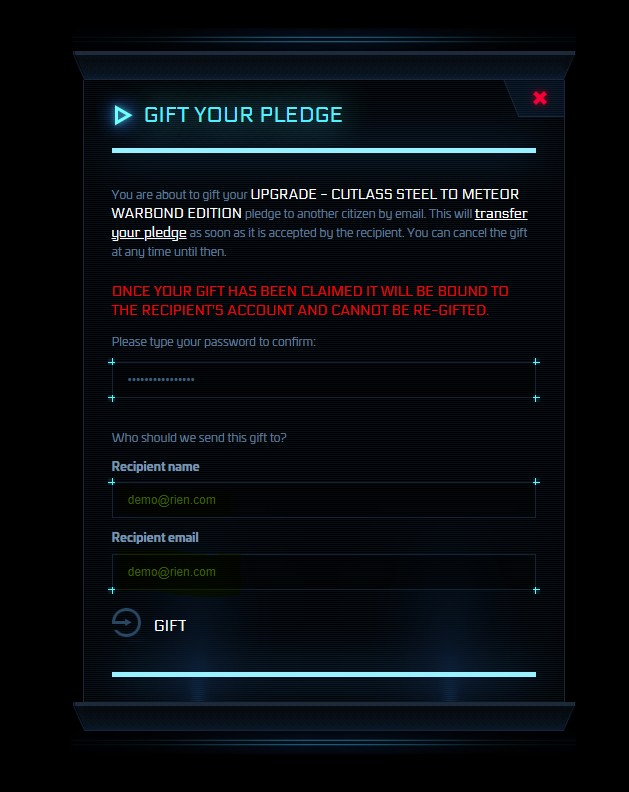
❌ Screenshot BEFORE Sending
Click to enlarge
❌ Missing: Confirmation message
Why invalid: Shows intent, not actual delivery
❌ Cropped Screenshot

Click to enlarge
❌ Missing: Full timestamp, URL, complete info
Why invalid: Cannot verify authenticity
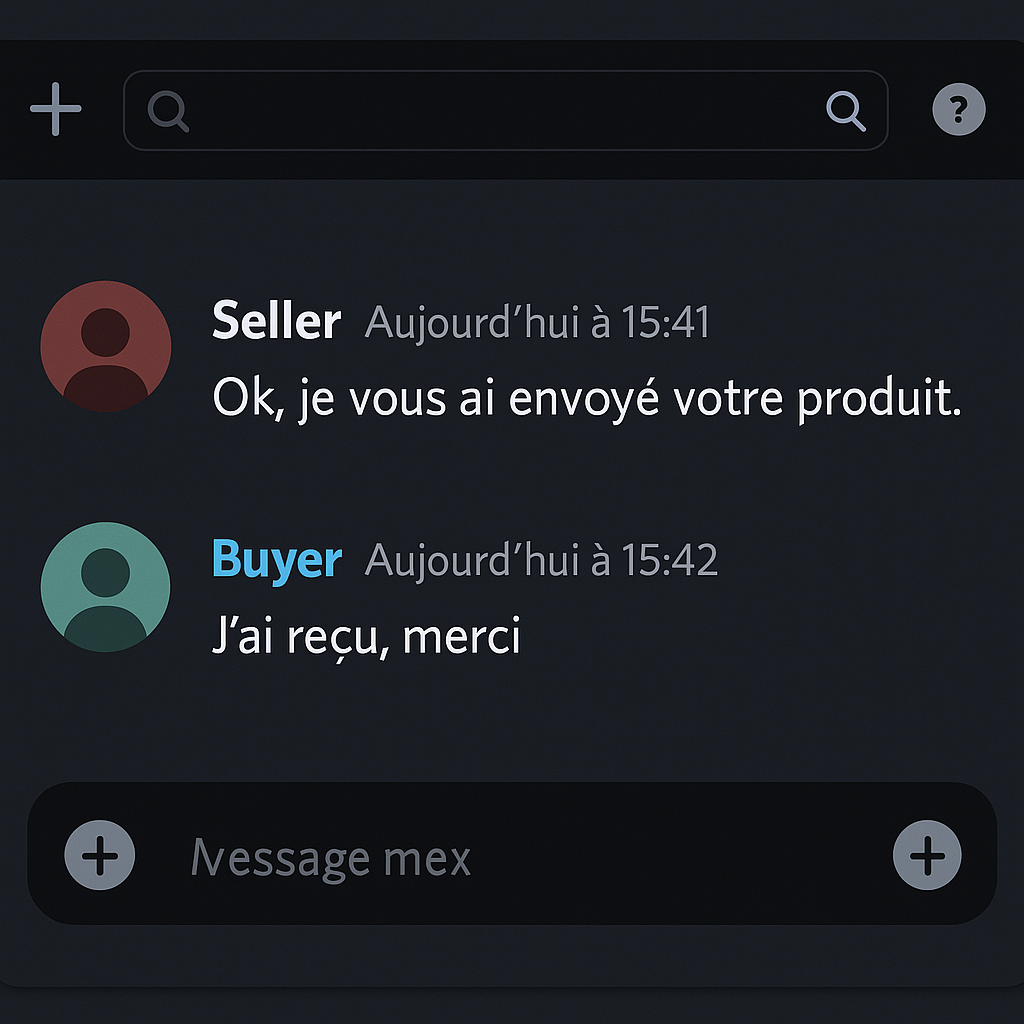
❌ Discord/Chat Screenshot
Click to enlarge
❌ Missing: RSI system confirmation
Why invalid: Third-party communication ≠ delivery proof
Screenshot Best Practices
✅ DO
- Take full-screen captures
- Show the full browser/game window
- Include URL bar (if on website)
- Make sure text is readable
- Show timestamps when possible
- Capture in high resolution
- Upload immediately after delivery
- Keep backups in cloud storage
❌ DON'T
- Crop images excessively
- Edit or modify screenshots
- Hide relevant information
- Submit blurry or low-res images
- Use screenshots from phone camera
- Take photos of screen with phone
- Forget to show buyer's email
- Submit proofs days later
Proof Retention Requirements
Minimum Days
Required retention period
Recommended Days
For best protection
High-Value Items
Until buyer reviews
Delete Screenshots Too Early = Lose Disputes Automatically
If you delete proof before 180 days and buyer disputes, you lose automatically. Disputes can be filed up to 30 days after delivery, and investigations take 60-90 days.
Where to Store Proofs
Cloud Storage
Google Drive, OneDrive, Dropbox
External Drive
USB, Hard drive backup
Platform Dashboard
Auto-saved 180 days
Email Backup
Send to yourself
Common Errors to Avoid
-
❌ Confirm delivery without uploading proof first
→ Upload proof BEFORE clicking 'Mark as Delivered' -
❌ Use buyer's screenshot as your proof
→ Only seller's proof counts in disputes -
❌ Edit or crop screenshots
→ Any editing voids proof (even cropping for size) -
❌ Take photo of screen with phone
→ Must be digital screenshot (clearer + metadata) -
❌ Partial screenshots
→ Must show full page/window with all info -
❌ Screenshots from wrong account
→ Must be from YOUR RSI account showing YOU sent it
Frequently Asked Questions
Quick Verification Checklist
Before Confirming Delivery, Verify:
- ☐ Screenshot includes buyer's RSI handle
- ☐ Item name visible and matches listing
- ☐ Date & timestamp clearly visible
- ☐ RSI 'Gifted to (buyer email)' message shown
- ☐ Screenshot is clear (not blurry)
- ☐ Full page/window captured (not cropped)
- ☐ File uploaded to order dashboard
- ☐ Backup saved to cloud storage
- ☐ Filename includes order number
- ☐ Original file (not edited/compressed)
Need Help with Proofs?
Proof Support
- Ticket System
- 📧 Email: [email protected]
- ⏱️ Response Time: 24-48 hours
Common Issues
- Evidence Rejected? Submit ticket with order number, original screenshot, explanation
- Screenshot Not Clear? Take new screenshot if still within 24h, use higher resolution
- Technical Issues? Check file format (JPG, PNG), verify size (under 10MB)
Remember: Screenshot confirmation page = 100% protection!
2 minutes of evidence collection — Complete peace of mind and guaranteed payout
How Our Escrow Works
Your money stays safe until delivery is confirmed - guaranteed protection for every transaction
What is Escrow?
Simple Explanation
Escrow is like a trusted middleman who holds your money safely while the seller delivers your item. Once you confirm you received what you paid for, we release the payment to the seller.
Sellers can't run away with your money before delivery
You have 24 hours to inspect before accepting
Why It's Safe
- 💰 Your money is locked - Seller can't access it until you approve
- ⏱️ 24h inspection period - Full refund if item doesn't match
- 🔒 Secure platform - We hold funds in isolated account
- ⚖️ Dispute resolution - Fair arbitration if issues arise
The Escrow Process - Step by Step
Step 1: Buyer Pays ($3 Escrow Fee)
- Buyer selects item and clicks 'Buy Now'
- Payment processed via Stripe (secure payment gateway)
- Funds immediately locked in escrow account
- Seller receives notification to deliver
Money Locked
Safe in escrow
Step 2: Seller Delivers (Within 24h)
Item Delivered
Proof uploaded
- Seller gifts item in RSI Hangar
- Must upload delivery proof screenshot
- Buyer receives notification to inspect
- Order status: 'Delivered - Awaiting Confirmation'
Step 3: Buyer Inspects (24h Window)
- Buyer logs into RSI Hangar to check item
- Verifies it matches listing description
- 24 hours to accept OR dispute
✅ Accept: Item is correct → Funds released to seller in 24h
❌ Dispute: Item wrong/missing → Full refund process starts
Inspection Time
24h to verify
Step 4: Acceptance (Manual or Automatic)
Confirmation
Auto or Manual
✅ Manual Acceptance
- Buyer clicks 'Confirm Receipt'
- Funds released to seller in 24h
- Transaction complete
⏰ Automatic Acceptance
- If no action after 24h
- System auto-confirms delivery
- Funds released to seller in 24h
Step 5: Seller Gets Paid (24h After Acceptance)
- Funds held for 24h security period
- Then automatically transferred to seller's wallet
- Seller can withdraw (minus platform fee)
- Transaction complete!
Payment Released
Seller receives funds
Escrow Fees
💰 Buyer Pays
One-time fee per order. Covers secure payment processing and protection.
💸 Seller Pays
Deducted from payout. Covers escrow service, dispute resolution, and platform maintenance.
• Buyer pays: $103 (item + $3 escrow)
• Seller receives: $86 ($100 - 14% commission)
What if There's a Dispute?
Dispute Process
- Buyer clicks 'Open Dispute' within 24h
- Funds remain locked in escrow
- Both parties submit evidence
- Platform reviews (48-72h)
- Decision made based on proof
Possible Outcomes
- Full Refund: Item not delivered or wrong item
- Partial Refund: Item delivered but not as described
- No Refund: Buyer claim unfounded, seller has proof
Your Security Guarantees
Isolated Escrow Account
Your funds are held in a separate, secure account - never mixed with company funds.
SSL Encrypted Payments
All transactions processed via Stripe with bank-level 256-bit encryption.
Evidence-Based Disputes
Fair resolution based on proof, not opinions. Screenshots required from sellers.
Common Questions About Escrow
Quick Timeline Reference
| Event | Timeframe | What Happens |
|---|---|---|
| 💳 Payment | Instant | Funds locked in escrow immediately |
| 📦 Delivery | Within 24h | Seller must deliver and upload proof |
| 🔍 Inspection | 24h window | Buyer accepts or disputes |
| ✅ Auto-Accept | After 24h | If no action, delivery auto-confirmed |
| 💰 Seller Payout | 24h after accept | Funds released to seller's wallet |
Questions About Escrow?
Get Help
- Ticket System
- 📧 Email: [email protected]
- ❓ Full FAQ: View all questions
• Check your order dashboard for status updates
• Review this guide for common questions
• Have your Order Number ready
Remember: Escrow protects BOTH buyers and sellers - it's the foundation of trust in our marketplace!
Always inspect within 24h — Your protection window starts when seller marks as delivered.
Delivery Guide
Step-by-step instructions to deliver items correctly and get paid quickly
Delivery Timeline
24 hours after payment
RSI Gift Screenshot
24-48h after buyer confirms
Complete Delivery Process
Step 1: Check Order Details Carefully
Before You Start Delivery:
- Go to your Dashboard → My Sales
- Find the order marked 'Paid - Awaiting Delivery'
- Verify buyer's email address - Check spelling carefully!
- Confirm the exact item name and variant
- Check any special instructions from buyer
Verify Everything
Double-check details
Step 2: Login to RSI Website
Click to enlarge
- Go to robertsspaceindustries.com
- Login with your credentials
- Navigate to 'My Hangar' from your account menu
- Locate the item you need to gift
Step 3: Gift Item to Buyer
Gifting Process:
- In 'My Hangar', find the specific item
- Click the dropdown arrow next to the item
- Select 'Gift' option
- Enter buyer's email address EXACTLY as shown in order
- Add optional gift message if desired
- Confirm the gift
One typo = item lost forever!
Copy-paste from order details to avoid errors
Click to enlarge
Step 4: Capture Proof of Delivery Screenshot
Click to enlarge
Required Screenshot Elements:
- ✅ Gift confirmation page from RSI
- ✅ Buyer's email address visible
- ✅ Item name clearly shown
- ✅ Date/time of gift visible
- ✅ Full browser window (no cropping)
• Cropped screenshots
• Hangar view (not gift confirmation)
• Email notifications
• Chat/Discord messages
→ See Proof of Delivery Guide for examples
Step 5: Upload Proof to Order
Upload Process:
- Go to Dashboard → My Sales
- Click on the specific order
- Find 'Upload Delivery Proof' section
- Click 'Choose File' and select your screenshot
- Add optional delivery notes
- Click 'Mark as Delivered'
• Upload immediately after gifting
• Accepted formats: JPG, PNG
• Max size: 10MB
Upload Now
Within 24h deadline
Step 6: Wait for Buyer Confirmation
Wait Period
24-48h max
What Happens Next:
- Buyer receives notification to inspect
- Buyer has 24h to confirm or dispute
- If buyer confirms: Funds released to your wallet in 24h
- If buyer doesn't respond: Auto-confirmed after 24h
- If buyer disputes: Dispute resolution process starts
• Item gifted to correct email address
• Valid proof uploaded within 24h
• Item matches listing description
→ You'll get paid, guaranteed!
Common Delivery Mistakes to Avoid
❌ Email Address Errors
- Typo in buyer's email address
- Wrong capitalization
- Extra spaces or characters
- Confusing similar email addresses
❌ Invalid Proof Screenshots
- Screenshot of hangar instead of gift confirmation
- Cropped or partial screenshot
- Gift email instead of RSI page
- Blurry or unreadable image
❌ Missing Deadline
- Not delivering within 24h
- Forgetting to upload proof
- Delaying without communication
❌ Wrong Item Delivered
- Different ship variant
- Wrong color/skin
- Different package than listed
Pre-Delivery Checklist
Before clicking 'Mark as Delivered', verify:
- ☑️ Order status shows 'Paid - Awaiting Delivery'
- ☑️ Buyer's email address copied exactly from order
- ☑️ Item name matches listing 100%
- ☑️ Gift successfully sent in RSI
- ☑️ Screenshot shows gift confirmation page
- ☑️ Buyer's email address visible in screenshot
- ☑️ Item name visible in screenshot
- ☑️ Screenshot is clear and uncropped
What If Something Goes Wrong?
This is a critical error.
- Contact support immediately
- Explain the situation honestly
- Provide all order details and proof of error
- You may need to refund or resend the item
Prevention: Always copy-paste email address from order details!
If you have valid proof:
- Don't worry - your proof protects you
- Buyer needs to check RSI Hangar (sometimes takes a few minutes)
- If dispute opens, provide your screenshot
- Platform will verify your proof and rule in your favor
This is exactly why proof of delivery is mandatory!
- Contact support immediately with order details
- Explain the delay reason (technical issue, timezone, etc.)
- Provide realistic new delivery time
- Support team will notify the buyer on your behalf
Communication prevents disputes! Support will help coordinate with the buyer.
Common reasons:
- Screenshot was cropped (must show full browser window)
- Showed hangar view instead of gift confirmation page
- Buyer's email address not visible or unclear
- Item name not visible in screenshot
Solution: Upload a new, valid proof. See Proof of Delivery Guide for examples of valid screenshots.
When Do I Get Paid?
| Event | Timeframe | What Happens |
|---|---|---|
| 💳 Buyer Pays | Instant | You receive notification - Start delivery process |
| 📦 You Deliver | Within 24h | Gift item + Upload proof + Mark delivered |
| ✅ Buyer Confirms | 0-24h | Buyer inspects and accepts delivery |
| 🔒 Security Hold | 24h | Funds held for security (standard process) |
| 💰 You Get Paid | 24h after confirm | Funds released to your wallet - You can withdraw! |
Best Practices for Smooth Deliveries
Deliver Fast
Deliver within 1-2 hours of payment when possible. Fast delivery = happy buyers = good reviews!
Communicate
If any delay or issue, contact support immediately. They will handle buyer communication and prevent disputes.
Perfect Proof
Always capture full-screen gift confirmation. Clear proof = no disputes = guaranteed payment.
Delivery Issues?
Get Help
- Proof of Delivery Guide: See examples of valid/invalid screenshots
- Support Ticket: For technical issues, delays, or disputes
- 📧 Email: [email protected]
Remember: Fast delivery + valid proof + correct email address = happy buyer + guaranteed payment!
Build Your Reputation: Consistent reliable deliveries earn you 5-star reviews and repeat customers.
Disputes & Resolution
Complete guide to resolving transaction issues fairly and efficiently
Critical Timelines
Within 24 hours of delivery
48 hours to respond
48-72 hours decision
When Should You Open a Dispute?
✅ Valid Dispute Reasons
- Non-Delivery: Seller didn't deliver within 24 hours
- Wrong Item: Received completely different item than listed
- Item Not as Described: Major discrepancies from listing
- Missing Items: Incomplete delivery (missing ships, upgrades)
- Seller Fraud: Scam, fake proof, or unauthorized item recovery
❌ Invalid Dispute Reasons
- Buyer's remorse (changed your mind)
- Misread listing description
- Game publisher nerfs/buffs item
- You already accepted delivery
- Price dropped after purchase
- Your game account banned (your fault)
Complete Dispute Resolution Process
Step 1: File Your Dispute (Within 24 Hours)
How to File:
- Login to your account → Dashboard → My Orders
- Find the problematic order (marked 'Delivered')
- Click 'File Dispute' button (red button)
- Select dispute reason from dropdown
- Write detailed explanation (facts, not emotions)
- Upload evidence (screenshots, videos, chat logs)
- Review and submit
File Immediately
Don't wait 24 hours!
Step 2: Seller Responds with Counter-Evidence (48 Hours)
Seller Notified
48h to respond
What Happens:
- Seller receives immediate notification via email + Platform
- Escrowed funds FROZEN (not released to seller)
- Seller has 48 hours to respond with counter-evidence
- Seller uploads proof of delivery (screenshots, logs)
- Seller provides explanation defending their side
Step 3: Your Response to Seller's Evidence (48 Hours)
Your Obligations:
- Review seller's counter-evidence carefully
- You have 48 HOURS to respond (check email!)
- Upload additional evidence if seller's proof is fake/invalid
- Provide detailed rebuttal explaining why seller is wrong
- Respond to Platform requests for clarification
48-Hour Deadline
Enable email alerts!
Step 4: Final Resolution Committee Decision (48-72 Hours)
Independent Review
Expert decision
What the Committee Reviews:
- Your dispute claim + evidence (screenshots, explanation)
- Seller's counter-evidence + proof of delivery
- Transaction history of both parties
- Original listing description + images
- Reputation scores and past disputes
Required Evidence for Strong Claims
| Evidence Type | What to Provide | Quality Requirements |
|---|---|---|
| Proof of Non-Delivery | RSI Hangar screenshots showing item NOT in your account, no gift logs, no account upgrades | Full screen, timestamps visible, character name shown, clear UI |
| Item Mismatch Proof | Original listing + received item side-by-side, highlighting differences (variant, color, upgrades) | Both screenshots clearly show differences, timestamps, item names visible |
| Timestamps/Dates | All screenshots with visible date/time, delivery notification time, dispute filing time | System clock visible in screenshots, consistent timezone |
- High resolution (1080p minimum)
- Full browser window or game screen (no cropping)
- All UI elements visible (timestamps, character names, item details)
- No Photoshop or edits (we can detect alterations!)
- Multiple angles/views of same issue strengthen claim
Possible Dispute Outcomes
✅ Buyer Wins (Full Refund)
When this happens:
- Seller didn't deliver within 24h
- Seller provided fake/invalid proof
- Item completely wrong (not as listed)
- Seller engaged in fraud
What you get:
- Full refund of item price
- Refund to original payment method
- Processed within 3 business days
- Seller penalized (warning, suspension, or ban)
❌ Seller Wins (No Refund)
When this happens:
- Seller provided valid proof of delivery
- Item matches listing description
- Buyer's remorse or misread listing
- You didn't respond within 48 hours
What happens:
- Funds released to seller immediately
- NO refund for you
- Item is yours (sale final)
- Frivolous dispute may result in penalty
⚖️ Partial Resolution (Split Responsibility)
When this happens:
- Both parties share some fault
- Minor discrepancies (not major fraud)
- Miscommunication caused issue
What you get:
- Partial refund (e.g., 30%, 50%, 70%)
- Percentage based on Committee evaluation
- Both parties split loss
🔄 Re-Delivery Opportunity
When this happens:
- Technical error (not seller fraud)
- Wrong email used (honest mistake)
- Seller willing to fix
What happens:
- Seller gets 24h to re-deliver correctly
- Funds remain in escrow
- You get new 24h inspection period
- If re-delivery fails = automatic refund
Common Dispute Mistakes to Avoid
❌ Filing Too Late
- Waiting more than 24 hours after delivery
- Accepting delivery then disputing later
- Not checking email for delivery notification
❌ Missing Response Deadline
- Not responding to seller's counter-evidence within 48h
- Ignoring Platform requests for clarification
- Email notifications disabled
❌ Weak Evidence
- Cropped or blurry screenshots
- No timestamps visible
- Emotional rants instead of facts
- Missing communication logs
❌ Initiating Chargebacks
- Filing PayPal/Stripe/Credit card disputes
- Bypassing Platform dispute system
- Claiming 'unauthorized transaction'
Frequently Asked Questions
NO - with one rare exception.
Once you accept delivery (manually or automatically after 24h), the sale is FINAL. Digital goods cannot be returned.
ONLY Exception: Proven seller fraud where seller stole item back AFTER delivery (unauthorized recovery via game support). Requires solid proof.
Prevention: ALWAYS inspect items within 24 hours before acceptance!
If seller doesn't respond within 48 hours:
- Dispute automatically escalates to Final Resolution Committee
- Committee reviews your evidence only (seller silence = weak defense)
- High chance of buyer victory if your evidence is strong
- Seller may receive penalty for non-cooperation
Your proactive evidence submission is crucial when seller is silent!
NO. The Committee decision is final and binding.
By creating an account, you agreed to:
- Accept Committee decisions without appeal
- Not pursue external legal action for transaction disputes
- Not initiate chargebacks (results in permanent ban)
This ensures fast, final resolutions instead of endless appeals.
Typical Timeline:
- Day 1: You file dispute
- Day 1-3: Seller responds (up to 48h)
- Day 3-5: Your counter-response (up to 48h)
- Day 5-8: Committee review (48-72h)
- Day 8: Final decision + funds distribution
Average resolution time: 5-7 days. Faster if parties respond quickly!
Frivolous disputes have serious consequences:
- First offense: Warning + dispute fees charged
- Second offense: Account suspension (7-30 days)
- Third offense: Permanent ban + funds forfeiture
- Proven fraud: Immediate ban + possible legal action
Only file disputes for legitimate issues. Committee can detect false claims!
NO. The $3 escrow fee is NEVER refundable.
The escrow fee covers:
- Secure payment processing
- Funds holding in escrow
- Dispute resolution service (Committee review)
- Platform infrastructure + security
Even if you win dispute and get full refund of item price, the $3 escrow fee is not refunded because the service was already provided.
This policy is disclosed at checkout before payment.
Best Practices for Winning Disputes
Act Fast
Don't wait 24 hours! File dispute IMMEDIATELY when you discover issue. Earlier = better.
Document Everything
Take screenshots BEFORE filing dispute. Full screen, timestamps visible, multiple angles. More proof = stronger case.
Be Professional
Write factual, calm explanations. No emotions, insults, or threats. Professional tone = Committee takes you seriously.
Enable Notifications
Turn on email alerts for dispute updates. Missing 48h response deadline = automatic loss!
Follow Process
Use Platform dispute system ONLY. Never chargebacks, never PayPal disputes, never legal threats = ban!
Cooperate Fully
Respond to ALL Committee requests. Provide requested evidence ASAP. Cooperation shows good faith.
Need Dispute Support?
Get Help
- Support Ticket: For dispute guidance, evidence questions, or technical issues
- 📧 Email: [email protected] (include order number + dispute ID)
- Buyer Protection Guide: See complete refund rights and buyer protection details
- Proof of Delivery Guide: Examples of valid vs invalid evidence screenshots
Remember: File disputes within 24h, provide strong evidence, respond within 48h deadlines, and accept Committee decisions. Most disputes (95%) are resolved fairly!
Our Commitment: The Final Resolution Committee reviews every dispute impartially with zero bias. Evidence = truth.
Transaction Timeline
Understanding the complete order process from payment to payout
Quick Overview
Visual Timeline
Buyer Purchases Item
Payment held in secure escrow - Seller receives instant notification - 24h delivery countdown starts
Seller Delivers Item
RSI gift sent to buyer's email - Delivery proof screenshot uploaded - Must complete within 24 hours
Buyer Inspects & Confirms
24-hour inspection window - Buyer checks item in RSI hangar - Confirms delivery OR files dispute
Funds Released to Seller
After buyer confirmation, funds transferred to seller's wallet within 24 hours - Transaction complete
Detailed Step-by-Step
Step 1: Buyer Purchases Item Instant
What Happens
- Buyer adds item to cart and completes checkout
- Payment processed via Stripe
- Funds LOCKED in escrow (seller can't access yet)
- Seller receives email notification
- Order status: Awaiting Delivery
Important Details
Buyer's verified email is automatically provided to seller. No direct communication needed.
24-Hour CountdownSeller has 24 hours to deliver from this moment. Timer starts immediately.
Step 2: Seller Delivers Item Within 24h
What Happens
- Seller logs into RSI website
- Navigates to 'My Hangar' and selects item
- Sends RSI Gift to buyer's email (provided by platform)
- Takes screenshot of RSI gift confirmation page
- Uploads proof screenshot to order page
- Order status: Delivered - Awaiting Confirmation
Critical Points
Seller does NOT contact buyer. Buyer's email is already in the order. Everything goes through the platform.
RSI Gift is the ONLY accepted method. No account transfers, no in-game trades, no other methods.
Step 3: Buyer Inspects & Confirms 24h window
What Happens
- Buyer receives email notification from platform
- Buyer checks email for RSI gift
- Buyer accepts gift in RSI and verifies item in hangar
- Buyer has 24 hours to:
Item received correctly → Click 'Confirm Delivery' button
Item wrong/missing → Click 'File Dispute' button within 24h
Deadline Critical
Buyer MUST confirm or dispute within 24 hours of delivery. After 24h, delivery is AUTO-CONFIRMED and NO refunds possible (except proven seller fraud).
Money stays in escrow during inspection. Buyer is fully protected during this 24h window.
Step 4: Funds Released to Seller Within 24h
What Happens
- Buyer confirms delivery (or 24h auto-confirm)
- Escrow releases funds
- Seller receives payment in wallet within 24h
- Order status: Completed
Payout Details
Seller receives: Item price - Platform commission
💳 WithdrawalSeller can withdraw funds to bank account or keep in wallet for future purchases
What If Something Goes Wrong?
Platform automatically notifies seller when deadline approaches. If seller misses 24h deadline:
- Buyer can file dispute for non-delivery
- Full refund automatically granted to buyer
- Seller penalized (impacts reputation/fees)
Buyer must file dispute within 24h of delivery:
- Click 'File Dispute' button on order page
- Select reason: 'Wrong Item Delivered'
- Upload screenshot proof showing item in hangar
- Platform's Final Resolution Committee reviews evidence
If seller marked as delivered but buyer didn't receive anything:
- Check spam/junk folder for RSI gift email
- Verify email address in account settings
- If still nothing, file dispute within 24h
- Platform reviews seller's proof screenshot
Auto-confirmation system protects sellers:
- If buyer doesn't respond within 24h of delivery
- AND no dispute was filed
- AND seller uploaded valid proof
- Delivery is AUTO-CONFIRMED
- Funds released to seller automatically
Key Timelines Summary
| Action | Who | Deadline | What Happens If Missed |
|---|---|---|---|
| Delivery | Seller | 24 hours | Auto-refund to buyer + seller penalty |
| Inspection/Confirmation | Buyer | 24 hours | Auto-confirm + funds released to seller |
| File Dispute | Buyer | 24 hours after delivery | NO refund possible (except proven fraud) |
| Seller Payout | Platform | 24 hours after confirmation | Automatic process |
How You'll Be Notified
You'll receive notifications at every step via:
Instant notifications
In-app alerts
For verified phone numbers
Configure your notification preferences in Account Settings to choose which alerts you want to receive and how.
We're committed to fast, secure, and transparent transactions. Every timeline is designed to protect both buyers and sellers.